Guide
How to write meeting minutes from a recording
Minutes are not a transcript. They are the short record of what was decided, who owns the next step, and when it is due. A recording plus a searchable transcript lets you write that record accurately without taking notes every minute of the meeting.
- Capture decisions, action items, owners, and dates — not every sentence.
- Record with consent, and transcribe on the device after the meeting.
- Use marks and search to verify what was actually said.
- Send the draft within a day, while memory is still fresh.
Minutes vs transcript
The two documents serve different readers:
| Minutes | Transcript | |
|---|---|---|
| Purpose | Record decisions and next steps | Preserve what was said |
| Length | One page or a few bullets | As long as the meeting |
| Reader | Attendees, absent colleagues, management | People verifying a detail or quote |
| Detail | Outcome and owner | Every turn, including side remarks |
| Retention | Often kept long-term | Usually reviewed, then deleted |
Writing minutes from a recording does not mean publishing the transcript. The transcript is your evidence; the minutes are your summary.
Before the meeting
- Confirm that recording is allowed and that everyone present agrees.
- Put the agenda in front of you; it becomes the skeleton of the minutes.
- Download the speech model and run a short test recording.
- Keep the phone near the center of the table and away from the air conditioner.
During the meeting
You do not need to type while people talk. Listen, and mark the moments that will matter later:
- When a decision is made, add a mark.
- When someone accepts an action item, note the owner in your head and add a mark.
- When a date is agreed, mark it too.
A handful of marks is enough. They turn a 45-minute recording into a short list of places to revisit.
After the meeting: transcribe and label speakers
Transcribe the recording in the app. The speech recognition and single-meeting speaker separation run on the device. Rename Speaker 1 and Speaker 2 to the people in the room, merge groups that belong together, and correct any segment that landed on the wrong person.
Clear speaker labels make the next step much faster: you can see who proposed a change, who agreed, and who took the action.
Find decisions and action items
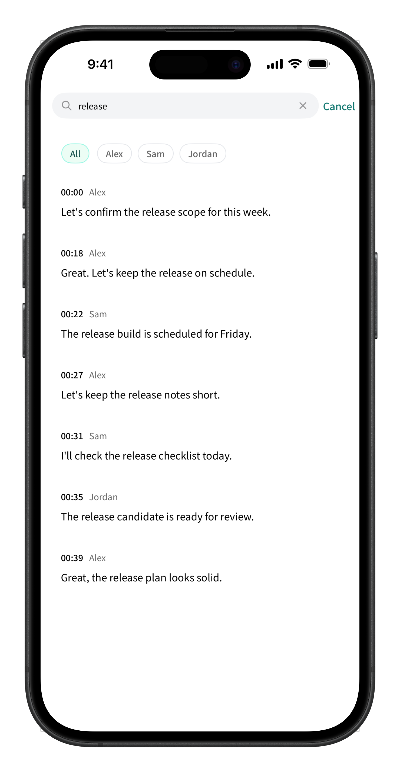
Search the transcript for the language people actually use:
- Decisions: “we decided”, “let's go with”, “the plan is”, the project or feature name.
- Actions: “I'll”, “can you”, “take a look”, “send”, “follow up”.
- Dates: “by Friday”, “next week”, “before the release”.
Tap a result to hear the exchange, then write the decision or action in your own words. If the wording is disputed later, the audio and timestamps settle it.
A simple minutes template
- Meeting: name, date, time, and attendees.
- Purpose: one sentence from the agenda.
- Decisions: what was decided, and the reason if it matters.
- Action items: task, owner, due date.
- Open questions: what was not resolved and who will follow up.
- Next meeting: date and expected topics.
Keep the wording neutral. Minutes record the outcome, not the tone of the argument.
Send the draft within a day
Send the draft while participants still remember the meeting. Ask them to correct owners and dates, then treat the corrected version as the record. If the recording is no longer needed after the minutes are approved, delete it along with the transcript — the minutes are the document you keep.
Privacy and retention
Scribo records and transcribes on the iPhone. Recordings, transcripts, and speaker labels stay in the app's local storage by default; the core transcription path does not upload them to Scribo's servers. Sharing is a deliberate action: export the minutes or a specific excerpt, and keep the raw recording only as long as your policy requires.
Frequently asked questions
Can Scribo write the minutes automatically?
No. Scribo produces a searchable transcript with speaker labels and timestamps. You still decide what belongs in the minutes: the decisions, owners, deadlines, and open questions. The transcript makes that review faster and more accurate.
How long should meeting minutes be?
Short enough that people read them. For a typical team meeting, one page or five to ten bullets covering decisions, action items, owners, and dates is enough. The transcript holds the detail; the minutes hold the outcome.
Should I share the transcript with the minutes?
Only when the detail is needed. A transcript contains side conversations and information that may not belong in a wider distribution. Share the minutes by default and the transcript or a specific excerpt when someone asks.
How do I find the exact decision in a long recording?
Add a mark when a decision is made, or search the transcript for phrases such as “we decided”, “let's go with”, or the name of the project. VIP users can search by keyword and speaker, then tap the result to hear the exchange.
Is the meeting recording uploaded to a server?
Scribo's core transcription path does not upload recordings or transcripts to its servers. The audio, transcript, and speaker labels stay on the device until you export or share them.
Get started
Turn the recording into minutes you can trust
Free download with 60 minutes of transcription included. No account required to start.