Guide
Meeting recording privacy and consent on iPhone
Recording a meeting raises two separate questions: are you allowed to record it, and where does the audio go afterwards? One is about consent and policy; the other is about how the app handles your data. On-device transcription changes the second answer, but it does not replace the first.
- Recording rules vary by country, state, and workplace; get consent before you start.
- On-device transcription keeps meeting audio on the phone in the core path.
- Tell participants how the recording will be used, and delete it when you no longer need it.
- Local processing lowers exposure, but it does not replace consent or company policy.
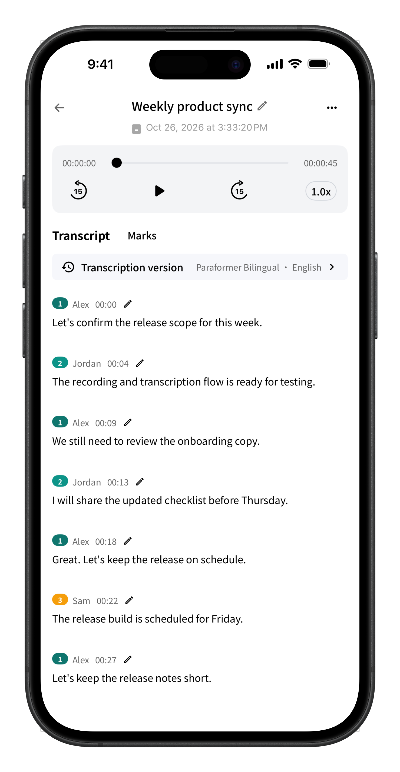
Two questions before you hit record
Meeting recording privacy is easier to reason about when you separate it into two questions:
- Permission. May this conversation be recorded, under the law where you are and the rules of your workplace?
- Data handling. Once recorded, where does the audio go, who can access it, and how long does it exist?
Answering the first question is a human and legal matter. The second depends on the tool you use. On-device transcription is designed to shrink the second answer: the audio is processed and stored on the phone instead of being uploaded.
Is it legal to record a meeting?
Recording law is not the same everywhere, and it can change. In general terms:
- All-party consent. Some jurisdictions require every participant to agree before a conversation is recorded.
- One-party consent. Others allow a participant to record without asking the others, though other rules may still apply.
- Workplace policy. Confidentiality agreements, customer contracts, and internal rules can be stricter than the law.
- Regulated content. Some meetings involve personal, financial, or health information that carries extra handling requirements.
This guide is not legal advice. If the meeting is important, regulated, or crosses borders, check with your legal or compliance team before recording. When you are unsure, the safest default is to ask everyone and wait for a clear yes.
What to say before you start recording
A short, specific announcement covers most of the social side of consent. It tells people that recording is happening, why, and where the audio will live:
“I'd like to record this meeting so I can focus on the discussion and share accurate notes. I'll transcribe it on my iPhone, and the audio stays on this device unless we decide to share something. Is everyone okay with that?”
Then pause. A clear “yes” from each participant is better than silence or a nod. If someone declines, do not record the parts that include them, or agree on an alternative such as written minutes.
Where the audio goes with on-device transcription
In an on-device workflow, the speech recognition model runs on the phone. That changes the data path in three practical ways:
- Processing. The recording is recognized locally; meeting audio is not sent to a server to be transcribed.
- Storage. The recording, transcript, and speaker labels stay in the app's local storage until you delete them.
- Sharing. A file leaves the device only when you export it, send it, or save it somewhere else.
Some operations still need a network. The speech model is downloaded and verified before first use, and subscription checks need connectivity. Those operations do not turn the recording itself into an upload.
On-device vs cloud: the data-flow difference
| Question | On-device transcription | Cloud transcription |
|---|---|---|
| Where is the audio processed? | On the phone | On the provider's servers |
| Is the recording uploaded? | Not in the core transcription path | Yes, to the provider |
| Who can access the audio? | Whoever can unlock the device | The provider, under its policies and access controls |
| How long is it retained? | Until you delete it from the device | Per the provider's retention settings |
| What does sharing add? | Only the copies you choose to export | The provider's storage plus any export |
Cloud tools can offer collaboration and larger models. The trade-off is that the meeting audio becomes data held by another party. The right choice depends on the sensitivity of the conversation and the rules that apply to it.
A pre-recording privacy checklist
- Confirm that recording is allowed, and get a clear yes from everyone present.
- Check whether company policy or a customer contract requires extra approval.
- Say why you are recording, where the audio will be stored, and who will see the notes.
- Record only what you need; stop the recording during breaks or sensitive side conversations.
- Keep the phone locked when you are not using it.
- Delete recordings and transcripts when their purpose is finished.
- Treat exported files as copies: once shared, they follow the recipient's storage and retention.
What Scribo stores, and what it does not
Scribo records and transcribes on the iPhone. Recordings, transcripts, and speaker information stay in the app's local storage by default. The core transcription path does not upload meeting audio or transcript text to Scribo's servers.
The servers handle app operations such as anonymous device sessions, purchase validation, and optional feedback. No account is required to start, and you can read the details in the privacy policy.
Frequently asked questions
Do I need consent to record a meeting?
It depends on where you are and who is in the room. Some places require everyone to agree before a conversation is recorded; others allow one participant to record. Workplace policy and confidentiality agreements can add their own rules. When you are unsure, ask everyone and confirm that they agree before you start.
Does on-device transcription mean nothing ever leaves the phone?
In Scribo's core transcription path, recordings and transcript text are not uploaded to Scribo's servers. The first model download, subscription checks, and optional feedback need a network. Files leave the device only when you choose to export or share them.
Does Scribo upload my recordings?
Scribo records and transcribes on the device. Its servers handle app operations such as anonymous device sessions, purchase validation, and optional feedback, but the core transcription path does not upload meeting audio or transcripts.
How long does Scribo keep a recording?
Recordings and transcripts stay in the app's local storage until you delete them. Because the core path does not upload them, there is no server-side copy to expire. Exported files are controlled by wherever you save or send them.
Can I use Scribo for confidential meetings?
Local processing reduces the number of places meeting audio can be exposed, but it does not replace consent or your organization's policy. Confirm that recording is allowed, tell participants how the recording will be used, and delete it when it is no longer needed.
Get started
Keep meeting audio on your device
Free download with 60 minutes of transcription included. No account required to start.