Guide
What is on-device transcription?
On-device transcription (also called local or offline transcription) runs the speech recognition model on the phone itself. Audio becomes text without being uploaded to a server. For sensitive conversations such as meetings and interviews, that means a smaller data footprint.
- Core transcription runs on the device; the recording is not uploaded.
- The speech model is downloaded and verified once before first use.
- Once the model is ready, core transcription does not depend on uploading the recording.
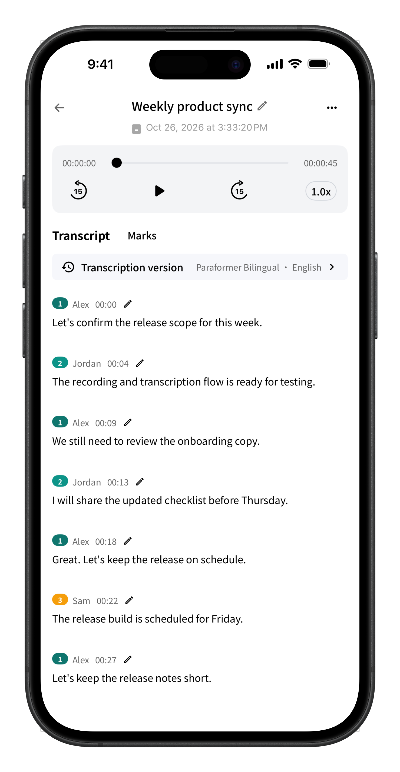
How on-device transcription works
On-device transcription keeps speech recognition computation on the device. It usually involves three parts:
- Model download and verification. Before the first use, the app downloads the speech recognition model and verifies its integrity.
- Computation on the device. The recording is segmented and recognized on the phone, then assembled into a timestamped transcript.
- Results stay local. The transcript is stored on the device alongside the recording. You decide when to share or delete it.
How it compares with cloud transcription
Both approaches turn speech into text. The differences are mainly where the data goes, what the network is needed for, and where the compute happens.
| Dimension | On-device | Cloud |
|---|---|---|
| Audio location | Stays on the device | Uploaded to the provider's servers |
| Network dependency | Core transcription does not upload the recording; model download needs a network | Every transcription needs a stable network |
| Processing speed | Depends on device performance and recording length | Depends on the network and server queues |
| Privacy boundary | Data stays on the device under your control | Requires trust in the provider's data handling |
| Capability ceiling | Limited by device compute and model size | Can use larger models and cross-device features |
Why meetings benefit from local processing
Meetings often include customer information, business plans, personnel discussions, and decisions that have not been announced yet. Uploading those recordings to a third-party server adds another layer of transfer, storage, and access-control risk. On-device transcription follows a data-minimization principle: what can stay on the device does not get sent out.
That is why Scribo keeps transcription on the device: recordings, transcripts, and speaker information stay local by default, and the server is not part of the core transcription path.
What on-device transcription cannot do
- First-time setup. The model must be downloaded and verified, and it needs storage space.
- Device load. Speed depends on the chip, battery level, and background tasks. Older devices take longer.
- Model limits. Distance, strong noise, and overlapping speech reduce accuracy.
- Feature scope. Cross-device sync and multi-user cloud collaboration usually belong to cloud-based products.
How Scribo handles the workflow
- Record a meeting, interview, or lecture inside the app.
- Download and verify the local speech recognition model before the first transcription.
- The recording is recognized on the device with speaker separation, and the transcript follows the timeline.
- Use full-text search to find a keyword, then tap the result to return to that point in the audio.
The core transcription path does not upload recordings or transcripts to Scribo's servers. Full-text search is a VIP benefit. Transcripts can be edited, exported as Word documents, or shared as the original audio through the system share sheet.
Where it fits best
On-device transcription suits privacy-sensitive work that still needs a searchable record: meeting notes, customer interviews, lectures, and personal memos. Before recording, confirm that everyone present knows about the recording and agrees to it.
Frequently asked questions
Is on-device transcription more accurate than cloud transcription?
Accuracy depends on the model, recording quality, and setting, so there is no single answer. Both approaches can do well in a quiet room with clear audio. Differences become more visible with strong noise, distance, or several people speaking at once. For an important meeting, record a one-minute test first.
Does on-device transcription need an internet connection?
The first model download and verification need a network. Once the model is ready, core transcription does not depend on uploading the recording. Subscription checks and similar operations may still require a network.
Are my recordings uploaded to a server?
Scribo's core transcription path does not upload recordings or transcript text to its servers. Recordings and transcripts stay on the device by default and leave only when you export or share them.
Does on-device transcription drain the battery?
Transcription is compute-intensive. Longer recordings and older devices take more time and power. For long recordings, keep the battery charged or connect to power.
Get started
Record your next meeting on-device
Free download with 60 minutes of transcription included. No account required to start.