Guide
Speaker separation on iPhone
Speaker separation, also called diarization, groups a transcript by who spoke when. It turns a wall of text into a conversation you can follow, search, and turn into notes. It is not voice identification: the app labels anonymous voices, and you decide who they are.
- Speaker separation labels who spoke when; it does not know people's names.
- Clear turns, a quiet room, and a central microphone give the best labels.
- Overlapping speech, similar voices, and very short replies are the hard cases.
- Scribo lets you rename, adjust, or merge speaker groups after transcription.
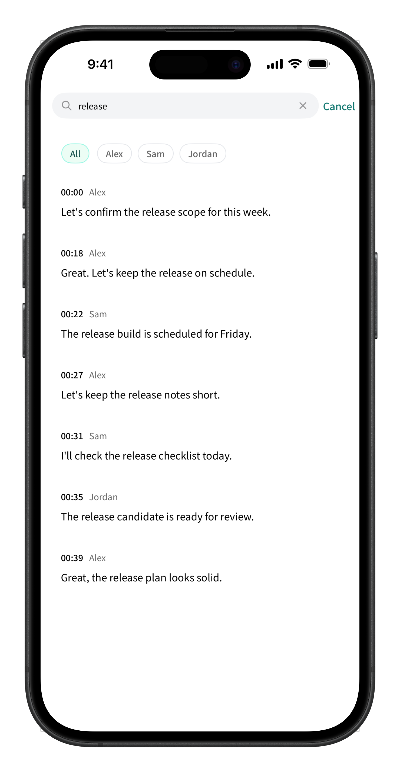
What speaker separation actually does
Speaker separation works in two stages:
- Segmentation. The recording is split into short stretches of speech separated by pauses.
- Grouping. Stretches that sound like the same voice are grouped under one label, such as Speaker 1 or Speaker 2.
The result is a transcript that follows the back-and-forth of the meeting. What it does not do is identify a person. It does not match a voice to an account, a contact, or a name; in Scribo, the labels start anonymous and you can rename them.
Why it matters for meetings and interviews
- Readability. A transcript without speaker changes is hard to scan. Labels make the structure visible.
- Notes and minutes. You can see who raised a point, who agreed, and who owns a next step.
- Search. VIP users can search by keyword and speaker, then jump back to the matching audio.
- Review. When a decision is questioned later, the speaker labels plus timestamps make the conversation easier to verify.
How Scribo handles speaker separation
- Speech recognition and single-meeting speaker separation run on the device.
- The transcript shows speaker labels along the timeline, with timestamps.
- After transcription you can rename speakers, adjust their groups, or merge groups that belong to the same person.
- Tapping a segment returns you to that point in the recording.
What makes speaker separation hard
Diarization is a best-effort process, not a guaranteed one. The common failure cases are physical, not mysterious:
- Overlapping speech. When two people talk at once, the audio contains two voices mixed together.
- Distance and noise. A phone across a large table, air conditioning, or a cafe background blurs the voice cues.
- Similar voices. People with similar pitch and rhythm are easier to confuse.
- Short interjections. A quick “yes” or “okay” may not contain enough audio to group reliably.
- Fast turn-taking. Speakers who cut in mid-sentence create one continuous stretch of speech.
- Language switches. Mixing languages in one meeting adds variation the model has to handle.
How to get cleaner speaker labels
- Place the phone near the center of the table. One device in the middle is usually better than a phone at one end.
- Reduce background noise. Close the window, move away from the air conditioner, and avoid speakerphone audio.
- Ask people not to talk over each other. A small pause between turns makes a visible difference.
- Have each person say their name once at the start. It gives you an anchor for renaming later.
- Keep turns reasonably long. A sentence or two is easier to group than a single word.
- Run a one-minute test for important meetings. Check the labels before the conversation gets complicated.
- Fix labels afterwards. Renaming and merging is usually faster than re-recording.
Fixing labels after transcription
No model gets every turn right, so the practical question is how quickly you can correct it. In Scribo, open the transcript, rename Speaker 1 and Speaker 2 to the people in the room, merge groups that belong together, and adjust segments that landed on the wrong speaker. The audio stays linked, so you can listen to a doubtful segment before changing it.
Privacy and speaker data
Speaker labels are part of the transcript, so they stay on the device with it. Scribo's core transcription path does not upload recordings, transcripts, or speaker information to its servers. Speaker separation is also not used to identify people across meetings; labels belong to a single recording.
Frequently asked questions
What is speaker diarization?
Diarization is the process of dividing a recording into segments and grouping them by speaker, so the transcript can show who spoke when. It answers “how many voices are here and when does each one talk”, not “what is this person's name”.
Can Scribo identify people by name automatically?
No. Speaker separation groups voices into anonymous labels such as Speaker 1 and Speaker 2. You can rename, adjust, or merge those groups after transcription so the transcript matches the people in the room.
Why were two people merged into one speaker?
When voices are similar, when people talk over each other, or when one person speaks only a few short words, the model may treat them as one voice. Merging or splitting the speaker groups afterwards is usually faster than re-recording.
Does speaker separation work offline?
In Scribo, single-meeting speaker separation runs on the device. The speech model must be downloaded and verified before first use, and subscription checks need a network, but the core transcription and speaker separation do not upload the recording.
Is speaker data uploaded to a server?
Speaker labels are stored with the transcript in the app's local storage. Scribo's core transcription path does not upload recordings, transcripts, or speaker information to its servers.
Get started
Turn a meeting into a conversation you can read
Free download with 60 minutes of transcription included. No account required to start.